Showing posts with label Blogger. Show all posts

Blog compatible to Mobile Phones


Blogger is now ready on your phone
how to implement to your blog?follow the simple steps below...


Sign into your Blogger account > Design > Edit html
Find this piece of code 

<b:include data='blog' name='all-head-content'/>
Immediately below that paste this code 

<meta content='IE=EmulateIE7' http-equiv='X-UA-Compatible'/>
<b:if cond='data:blog.isMobile'>
<meta content='width=device-width, initial-scale=1.0, user-scalable=0' name='viewport'/>
<b:else/>
<meta content='width=1100' name='viewport'/>
</b:if>

Save the Changes!
That's it! Now, your visitors can access your blogger blog through mobile phones.

Highlight Author Comment

image


This trick is to give a Highlight Author Comment . This will make the blog's owner comments looks different from the visitors comments. It's very usefull and interesting blogger hack tips. You can see the example in my blog. Here is what to do to make a "Highlight Author Comment" effect in Blogspot.


Login to blogger, then choose "Layout --> Edit HTML". Don't forget to backup your template first.
Check the "Expand Widget Templates" box.
find this piece of code  
]]></b:skin> 
and paste code below before the code you found.
.comment-body-author {
background: #E6E6E6; /* Background color*/
color: #000; /* Text color*/
border-top: 1px dotted #223344;border-bottom: 1px dotted #223344;border-left: 1px dotted #223344;border-right: 1px dotted #223344;
margin:0;
padding:0 0 0 20px; /* Posotion*/
}
 Then find this code:
<dl id='comments-block'>
<b:loop values='data:post.comments' var='comment'>
<dt class='comment-author' expr:id='"comment-" + data:comment.id'>
<a expr:name='"comment-" + data:comment.id'/>
<b:if cond='data:comment.authorUrl'>
<a expr:href='data:comment.authorUrl' rel='nofollow'><data:comment.author/></a>
<b:else/>
<data:comment.author/>
</b:if>
said...
</dt>

<b:if cond='data:comment.author == data:post.author'>
<dd class='comment-body-author'>
<p><data:comment.body/></p>
</dd>
<b:else/>

<dd class='comment-body'>
<b:if cond='data:comment.isDeleted'>
<span class='deleted-comment'><data:comment.body/></span>
<b:else/>
<p><data:comment.body/></p>
</b:if>
</dd>

</b:if>

<dd class='comment-footer'>
<span class='comment-timestamp'>
<a expr:href='"#comment-" + data:comment.id' title='comment permalink'>
<data:comment.timestamp/>
</a>
<b:include data='comment' name='commentDeleteIcon'/>
</span>
</dd>
</b:loop>
</dl>
The red color text is the code that you have to add to your script. The position must be right.
And then save your template.
* You have to login into your blogger account before to give comments.

Floating Feedback For Blogger


 Log in to your Blogger account > Design > Page Element > HTML/Javascript
and paste this code inside the box


<!--TNT-by-STC-FEEDBACK-IMAGE-STARTS-->
    <a style="display:scroll;position:fixed;bottom:0px;right:0px;" href="http://widgetscorner.blogspot.com/p/contact-us.html" title="FeedBack Now"><img onmouseover="this.src=&#39;Image 1&#39;" src="Image 2" onmouseout="this.src=&#39;Image 1&#39;" /></a>
    <!--TNT-by-STC-FEEDBACK-IMAGE-STOPS--></center>


Change the following in red with your own Contents.

Remove Blogger Favicon


Log in to your Blogger accountgo to Edit html
make sure to back up your templates first
Now find this code
</head>
Immediately before that paste this code below
<link href="Your Favicon URL" rel="shortcut icon"></link>

Change the Link in Red with your Icon
Preview it first
Then Save.

Tips:
To get any image you want... just "Right Click" the image and "COPY IMAGE LOCATION" and paste the url on the Code for Favicon.

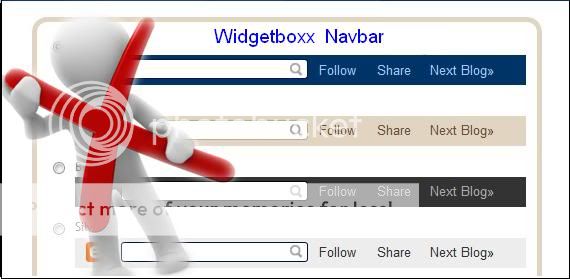
Remove Blogger Navbar


Navbar is part of Blogger which you can Share,Follow,Report blog,and Etc..Some of bloggers wants to remove that Navbar so i post One of many Tricks on how you can remove navbar...


How to remove Blogger Navbar?

Fist log in to your Blogger account
Click on Design,click on Edit Html Tab

Before you try this make sure to backup your templates just incase.
Now find this piece of code
/* Variable definitions
Immediately before that paste this code below
#navbar-iframe {
display: none !important;
}
Then click Preview first,
Then hit Save.

Blogger on MobilePhone


Blogger is now ready on your phone,now you can read anywhere,anytime you want,get updated to your favorite blogger sites, Do you want to have it on your blog?
How to implement to your blog?
follow the simple steps below...


Sign into your Blogger account > Design > Edit html
Find this piece of code
<b:include data='blog' name='all-head-content'/>
Immediately below that paste this code
<meta content='IE=EmulateIE7' http-equiv='X-UA-Compatible'/>
<b:if cond='data:blog.isMobile'>
<meta content='width=device-width, initial-scale=1.0, user-scalable=0' name='viewport'/>
<b:else/>
<meta content='width=1100' name='viewport'/>
</b:if>
Save the Changes!
That's it! Now, your visitors can access your blogger blog through mobile phones.

Blogger Stats


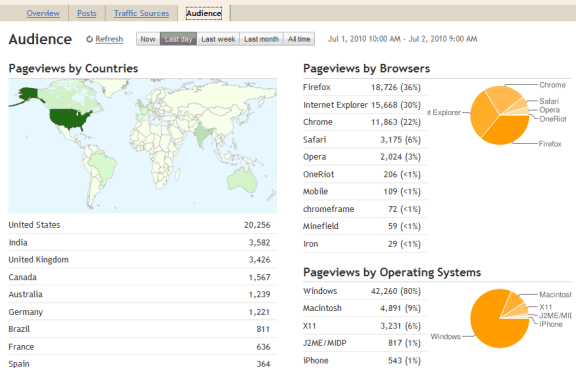
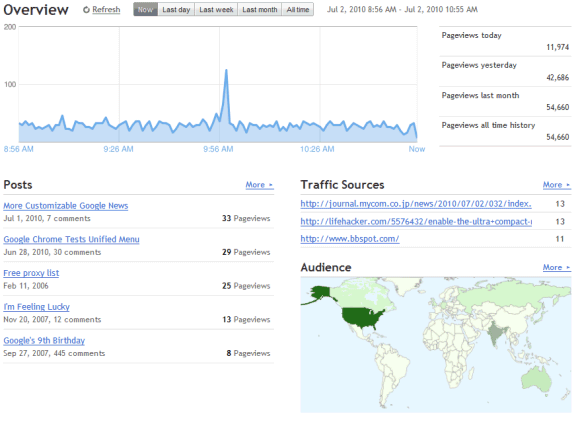
Introducing Blogger Stats


Just in time for our eleventh birthday, we are excited to introduce Stats for Blogger. First launched to Blogger in Draft back in July, Blogger Stats is a cool real-time stats service that's fully integrated with Blogger; you don't need to do anything to enable it for your blog. You can find the new Stats tab on your blog’s dashboard—go ahead and take it for a spin!


Feature Highlights

Stats is an important piece of the blogging puzzle, as it allows you to track your blog's traffic and find out exactly what your audience is looking for. As such, integrated, real-time stats has been one of the most frequently requested features from our users. You can find more information about Blogger Stats in our earlier announcement; meanwhile, here are some quick highlights for you.

* Real-time tracking. Each time your blog is viewed, you can see the change on your stats almost immediately
* Insights about your audience. Top search keywords, countries, browsers, and more
* Great user interface. Beautiful, easy-to-read graphs and charts


Updates

After our initial launch to Blogger in Draft, we had some very helpful feedback and suggestions from you. Based on them, we’ve made improvements including the following:

* Self-view exclusion. Some of you wanted Blogger Stats to exclude your own pageviews, and now there’s an option for that: On Stats | Overview, click on the “Don’t track your own pageviews” link (it’s on the right side, under the pageview summary) and select the “Don’t track my pageviews” option. We’re also now excluding traffic coming from Blogger admin pages and post Preview, providing more accurate pageview data.
* More effective bot traffic filtering. We’ve made several improvements to detect “bots” (the non-human visitors, such as crawlers) including extending our list of known “bots” to provide more accurate pageviews from real visitors.
* Internationalization. Blogger Stats is now available in more than 40 languages.


We hope you like Blogger Stats. By the way, there must be something good about August—not only is it our birth month, we’ve gone from four Admin Dashboard tabs to six, just this month alone! (The other new tab we’ve added this month was the Comments tab, which was another highly requested feature.) We still have some more ground to cover, but just wanted to say we’re working really hard to deliver the features you’ve wanted to see on Blogger. Looking forward to seeing you all at the upcoming Meetup!


Sign up for FREE daily Updates.